Accounting Software vs Invoicing Software: Which Does Your Business Actually Need?
You search for "best accounting software for small business" and get a wall of results: QuickBooks, Xero, FreshBooks, Wave, Zoho Books. You sign up for a free trial, open the dashboard, and immediately see terms like chart of accounts, general ledger, bank reconciliation, and journal entries. You close the tab.
Here is the thing most of these articles will not tell you: if you are a freelancer, consultant, or small service business, you probably do not need accounting software at all. You need invoicing software. They are different tools that solve different problems, and picking the wrong one costs you either money or time — usually both.
What accounting software actually does
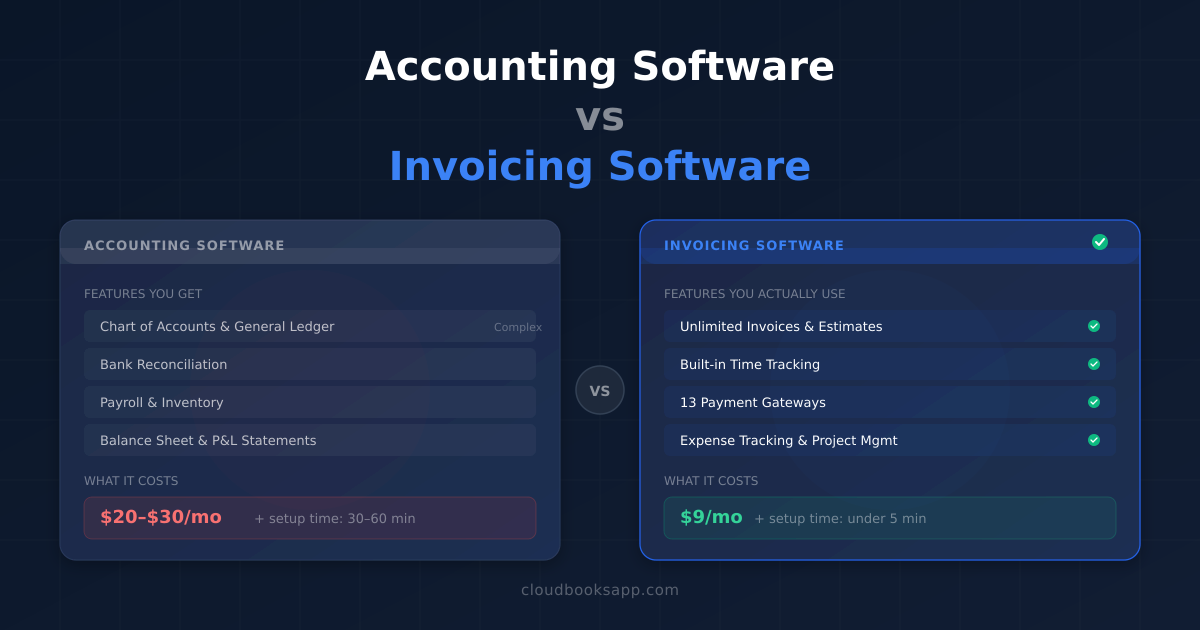
Accounting software is built around double-entry bookkeeping. Every transaction is recorded as a debit and a credit across accounts in a chart of accounts. The software maintains a general ledger, reconciles bank transactions, generates balance sheets and profit-and-loss statements, and in some cases handles payroll and inventory.
The major accounting platforms — QuickBooks, Xero, Sage, and Zoho Books — are designed for businesses that need to produce financial statements, manage accounts payable and receivable as formal accounting categories, and give an accountant or bookkeeper direct access to the books.
If you sell physical products, manage inventory, run payroll for employees, or need to produce audited financial statements for investors or lenders, accounting software is the right tool. It is not optional — it is infrastructure.
What invoicing software actually does
Invoicing software is built around the billing cycle: create an estimate, convert it to an invoice, send it, track whether it has been paid, and follow up if it has not. The better tools add time tracking, expense management, project management, and online payment collection — everything a service business needs to bill clients and get paid.
The difference is not just features. It is the mental model. Accounting software asks: "How should this transaction be categorised in your chart of accounts?" Invoicing software asks: "Who owes you money, and has it arrived yet?"
For a freelance designer, a consulting firm, a marketing agency, or a contractor billing time and materials, the second question is the one that matters every single day. The first question matters once a year, at tax time — and your accountant handles it.
The real cost of choosing wrong
Choosing accounting software when you need invoicing software
This is the more common mistake, because "accounting software" is what everyone searches for. Here is what happens:
- You pay more. QuickBooks starts at $30/month. Xero starts at $20/month and caps you at 20 invoices on the entry plan. Invoicing software like CloudBooks starts at $9/month with unlimited invoices.
- You waste time on setup. Accounting software asks you to configure a chart of accounts during onboarding. If you do not know the difference between assets and equity, you are stuck. Invoicing software lets you send your first invoice in under five minutes.
- You use 20% of the features. You never touch the general ledger, bank reconciliation, or journal entries. You use the invoice button and the expense tracker. You are paying for a cockpit when you need a steering wheel.
- You miss features you actually need. Many accounting platforms treat time tracking as an add-on or do not offer it at all. Xero charges extra for Projects. Wave does not have time tracking. Dedicated invoicing software includes it in every plan because billing time is core to service businesses.
Choosing invoicing software when you need accounting software
This mistake is less common but worth addressing. If your business has any of these characteristics, you genuinely need accounting software:
- You sell physical products and need to track inventory and cost of goods sold
- You run payroll for employees (not just contractors)
- You need to produce balance sheets for investors, lenders, or board members
- Your accountant specifically requires QuickBooks or Xero access for tax filing
- You have multiple bank accounts that need daily reconciliation
If none of those apply — and for most solo service providers, none of them do — invoicing software covers everything you need.
Feature comparison: accounting vs invoicing
| Feature | Accounting software | Invoicing software |
|---|---|---|
| Send invoices | Yes | Yes |
| Track expenses | Yes | Yes |
| Online payments | Yes (usually 1–2 gateways) | Yes (up to 13 gateways) |
| Time tracking | Add-on or missing | Built in |
| Project management | Rare | Common |
| Recurring invoices | Yes | Yes |
| Multi-currency | Higher plans only | All plans |
| Chart of accounts | Yes | No (not needed) |
| General ledger | Yes | No |
| Bank reconciliation | Yes | Manual imports |
| Payroll | Add-on | No |
| Inventory | Yes | No |
| Balance sheet | Yes | No |
| Setup time | 30–60 minutes | Under 5 minutes |
| Starting price | $20–$30/month | $9/month |
The pattern is clear. Accounting software wins on financial reporting depth. Invoicing software wins on billing workflow, payment flexibility, and time-to-value.
The "just use QuickBooks" trap
QuickBooks has 80% market share in small business accounting in the US. When someone asks "what software should I use for my business?" the default answer is QuickBooks. This is like answering "what vehicle should I buy?" with "a pickup truck." It is a great answer for some people and a terrible answer for others.
QuickBooks Simple Start costs $30/month and includes one user. Adding a second user costs $10/month. Time tracking is locked behind the Plus plan at $115/month. For a solo freelancer who needs to send invoices, track time, and get paid, that is a lot of money for features they will never use — while the features they actually need (time tracking, project management, multiple payment gateways) are either locked behind higher tiers or missing entirely.
QuickBooks is the right choice for businesses that need QuickBooks-level accounting. It is not the right choice by default.
When you need both — and how to avoid paying for both
Some businesses genuinely need invoicing features (time tracking, project billing, client-facing payment pages) and accounting features (bank reconciliation, tax reports, payroll). The instinct is to buy accounting software that also does invoicing, but the invoicing inside accounting software is usually basic — limited templates, fewer payment options, no time-to-invoice automation.
The practical approach for most small service businesses:
- Use invoicing software as your daily tool. This is where you create invoices, track time, manage expenses, and collect payments. You interact with it every day.
- Export clean data for your accountant at tax time. Good invoicing software exports income reports, expense reports, and payment records in formats your accountant can import into their accounting platform.
- Let your accountant handle the accounting. Unless you have accounting training, you should not be maintaining a general ledger or reconciling bank feeds yourself. Your accountant does this better and faster, and they need maybe four hours of work per quarter if your records are clean.
This approach costs less than accounting software ($9/month vs $30+/month), takes less of your time (no chart-of-accounts maintenance), and produces cleaner records (because you are using a tool designed for how you actually work, not wrestling with one designed for accountants).
What to look for in invoicing software
If you have read this far and concluded that invoicing software is the right fit, here is what separates good tools from mediocre ones:
- Unlimited invoices on every plan. Some tools (including Xero's entry plan) cap how many invoices you can send per month. If you are billing ten clients weekly, a 20-invoice cap means upgrading before you have even started. Look for unlimited invoices from the lowest tier.
- Built-in time tracking. If you bill by the hour, time tracking that flows into invoices without a separate app is not optional — it is the core workflow. One-click timers, project assignment, and automatic line-item conversion save hours every month.
- Multiple payment gateways. If you have clients in more than one country, a single gateway (just Stripe, or just PayPal) is not enough. Look for software that supports regional gateways like Razorpay, Paystack, Mollie, and GoCardless so clients can pay in their preferred local method.
- Automatic payment reminders. Chasing overdue invoices manually is a time sink. Configurable reminder sequences — a nudge before the due date, escalating follow-ups after — should run on autopilot.
- Expense tracking with receipt capture. Snapping a photo of a receipt and having the amount, vendor, and category extracted automatically beats a spreadsheet every time.
- Clean exports for tax time. CSV or PDF exports of income and expenses, organised by date and category, that your accountant can work with without calling you.
How the major tools stack up
Here is an honest positioning of the most common tools, based on what type of business they are built for:
Best for full accounting
- QuickBooks — the default for US businesses that need formal accounting. Powerful, expensive, steep learning curve. Best if your accountant requires it.
- Xero — strong alternative to QuickBooks, especially popular outside the US. Unlimited users on every plan. Better UI, similar depth.
Best for invoicing + getting paid
- CloudBooks — invoicing, time tracking, expense tracking, project management, and 13 payment gateways from $9/month. Built for freelancers and small service businesses who need to bill clients and get paid, not maintain a general ledger.
- FreshBooks — strong invoicing with time tracking. More expensive than CloudBooks ($19/month), fewer payment gateways. Good if you also need light accounting features.
Best free option
- Wave — free invoicing and accounting. The catch: no time tracking, no project management, and payment processing fees (2.9% + $0.60). Good for businesses with minimal invoicing needs and no need to track billable hours.
The decision flowchart
Answer these three questions:
- Do you sell physical products or manage inventory? If yes → accounting software (QuickBooks, Xero, Zoho Books).
- Do you run payroll for employees? If yes → accounting software with a payroll module.
- Do you primarily sell services, bill time, and send invoices? If yes → invoicing software. You will save money, set up faster, and spend less time on tools that were not built for your workflow.
Most freelancers, consultants, designers, developers, photographers, attorneys, and agencies fall into category three. If that is you, stop searching for accounting software. You have been looking for the wrong thing.
Getting started
CloudBooks is built for businesses that need invoicing done well — not businesses that need a general ledger done adequately. Plans start at $9/month with unlimited invoices, built-in time tracking, expense management, 13 payment gateways, and 160+ currencies. No chart of accounts. No journal entries. No learning curve.
Send your first invoice in under five minutes. Let your accountant handle the accounting.
Ready to streamline your invoicing?
Join 30,000+ businesses using CloudBooks to get paid faster.
Start Free TrialRelated Articles
How to Accept International Payments as a Freelancer in 2026
You land a client in Berlin, another in Lagos, a third in São Paulo. The work goes well. Then the in...
How AI Is Changing Invoicing and Bookkeeping for Small Businesses
Small business owners spend an average of five hours a week on invoicing and bookkeeping. That is fi...
5 Things to Keep in Mind While Choosing Invoicing Software
Are you looking for invoicing software but are not sure which one to go with? Well, even simple invo...