HoneyBook Alternative: Why Freelancers Are Switching to CloudBooks
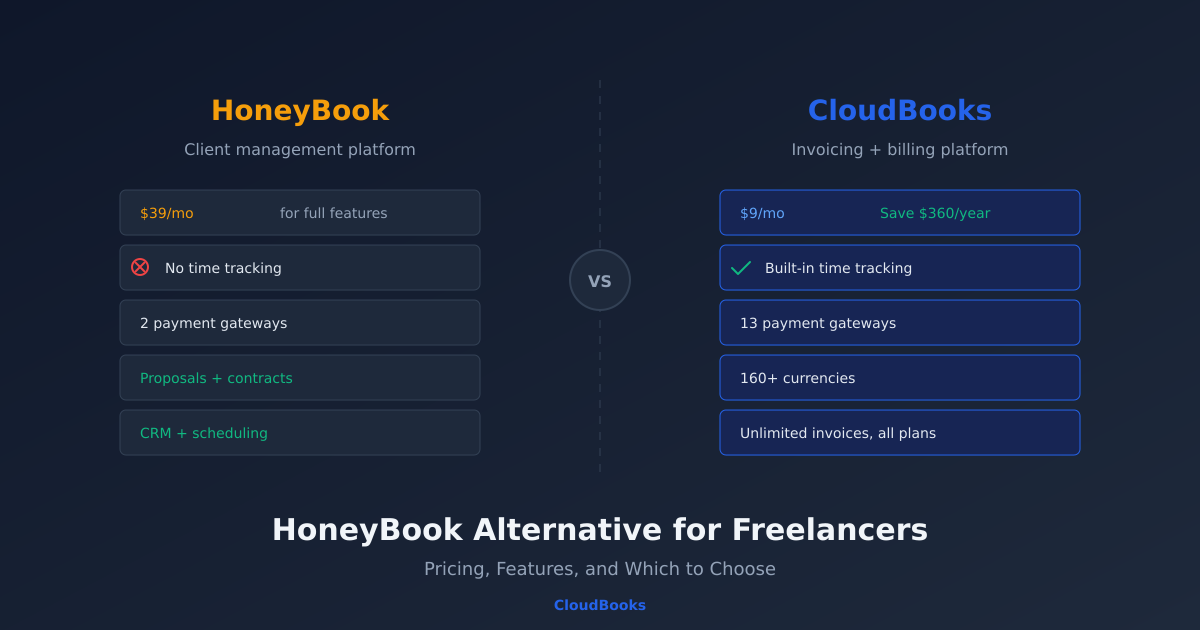
HoneyBook is popular with event planners, photographers, and creative professionals who need proposals, contracts, and invoicing in one place. But if your primary need is sending invoices, tracking billable hours, and getting paid from clients around the world, HoneyBook's pricing and feature set may not be the best fit.
This post compares HoneyBook and CloudBooks on the features that matter most to freelancers and service businesses — pricing, invoicing, time tracking, payment collection, and international support — so you can decide which is right for your workflow.
HoneyBook overview
HoneyBook is a client management platform designed for creative professionals. Its core workflow centres on proposals: you create a proposal with services and pricing, the client approves and signs a contract, and then you invoice. It bundles CRM features like lead tracking, scheduling, and workflow automation.
HoneyBook pricing: $19/month (Starter, limited features) or $39/month (Essentials with full features). The Premium plan is $79/month. All plans require annual billing for these rates — monthly billing is more expensive.
HoneyBook is strong at the pre-sale stage: proposals, contracts, and booking flows for event-based businesses. But once you move past proposals into day-to-day invoicing and payment collection, gaps appear.
Where CloudBooks differs
Pricing
CloudBooks starts at $9/month with unlimited invoices, time tracking, expense management, and multi-currency support included. HoneyBook's comparable plan (Essentials at $39/month) costs over four times as much. Over a year, that is $108 vs $468 — a $360 difference that adds up for budget-conscious freelancers.
Time tracking
If you bill clients by the hour — and most freelance developers, consultants, writers, and designers do — time tracking is not optional, it is core to your billing workflow. CloudBooks includes one-click timers on every plan. Start a timer when you sit down to work, stop it when you finish. At the end of the week, convert tracked hours to invoice line items in one click. No manual entry, no separate app.
HoneyBook does not include a time tracker. If you bill hourly, you need a third-party tool like Toggl or Clockify, which means maintaining two apps, exporting data, and manually entering hours on invoices. That is a workflow gap that costs time every billing cycle.
Payment gateways
HoneyBook processes payments through Stripe and its own payment system. That works well for US and European clients paying by credit card. But if your clients are in India, Africa, Latin America, or Southeast Asia, they may not be able to pay conveniently.
CloudBooks supports 13 payment gateways: Stripe, PayPal, Razorpay (India), Paystack (Africa), Flutterwave (Africa), Mollie (Europe — iDEAL, SEPA, Bancontact), GoCardless (UK/EU direct debit), Tap (Middle East), Xendit (Southeast Asia), Mercado Pago (Latin America), and more. Each invoice can use the gateway that matches your client's region, so a client in Lagos pays via Paystack while a client in Amsterdam pays via iDEAL — both from the same CloudBooks dashboard.
Multi-currency invoicing
CloudBooks supports 160+ currencies on every plan. Invoice your German client in EUR, your Indian client in INR, and your US client in USD — all from the same account, with automatic conversion tracking. HoneyBook supports multiple currencies but with more limited options and less granular conversion tracking.
Invoicing depth
Both platforms create and send invoices. The difference is in the details:
- Unlimited invoices: CloudBooks includes unlimited invoices on every plan. HoneyBook's Starter plan has limitations on active projects.
- Recurring invoices: Both support recurring invoices for retainer clients.
- Automatic payment reminders: CloudBooks sends configurable automatic reminders before and after the due date. HoneyBook has reminder functionality but it is less configurable.
- Tax handling: CloudBooks handles GST (CGST/SGST/IGST), VAT, and multi-tax configurations for international invoicing. This matters if you invoice clients across tax jurisdictions.
Feature comparison table
| Feature | CloudBooks | HoneyBook |
|---|---|---|
| Starting price | $9/month | $19/month (limited) |
| Full-feature price | $9/month | $39/month |
| Unlimited invoices | All plans | Essentials+ |
| Time tracking | Built in, all plans | Not available |
| Payment gateways | 13 gateways | Stripe + HoneyBook Payments |
| Currencies | 160+ | Limited multi-currency |
| Automatic reminders | Configurable sequences | Basic reminders |
| Proposals/contracts | Estimates (convertible to invoices) | Full proposal + contract + e-sign |
| CRM/lead tracking | Client management | Full CRM with pipeline |
| Scheduling | No | Built in |
| Workflow automation | Automatic invoicing + reminders | Visual workflow builder |
| Expense tracking | Built in with receipt scan | Limited |
When HoneyBook is the better choice
HoneyBook is genuinely better if your workflow is proposal-driven. If you are a wedding photographer who sends styled proposals with mood boards, gets contracts signed electronically, collects deposits through a booking flow, and automates follow-up sequences for leads — HoneyBook is built exactly for that. The proposal-to-contract-to-invoice pipeline is polished and purpose-built for creative event professionals.
HoneyBook also has a stronger CRM with lead stages, pipeline views, and scheduling integration. If managing your sales pipeline is as important as managing your invoices, HoneyBook covers both.
When CloudBooks is the better choice
CloudBooks is better if your workflow is billing-driven. If you are a freelance developer tracking 30 hours a week across three clients, a consultant sending monthly retainer invoices to international clients, or an agency billing project milestones with detailed line items — the invoicing and payment workflow is what you use daily, and it needs to be fast, flexible, and affordable.
Specific scenarios where CloudBooks wins:
- Hourly billing: Built-in time tracking with one-click invoice conversion. HoneyBook cannot do this without a third-party app.
- International clients: 13 payment gateways covering regions HoneyBook does not serve natively.
- Budget-conscious freelancers: $9/month vs $39/month for full features. The $360/year savings is significant for a solo business.
- High invoice volume: Unlimited invoices on every plan, with automatic reminders and recurring billing.
- Multi-currency billing: 160+ currencies with automatic conversion tracking on every plan.
Switching from HoneyBook to CloudBooks
If you are currently on HoneyBook and considering a switch, the transition is straightforward:
- Export your client list from HoneyBook and import it into CloudBooks.
- Set up your payment gateways — connect Stripe (you can reuse your existing Stripe account) plus any regional gateways you need.
- Recreate your recurring invoices — set up retainer invoices for ongoing clients.
- Start tracking time — set up projects and start using the one-click timer for billable work.
You do not need to move everything at once. Many freelancers run both tools in parallel for a month — honouring existing HoneyBook proposals while sending new invoices through CloudBooks — then fully switch once they are comfortable.
The bottom line
HoneyBook and CloudBooks serve different primary workflows. HoneyBook is a client management platform with invoicing. CloudBooks is an invoicing and billing platform with client management. If proposals and contracts drive your business, HoneyBook earns its higher price. If invoicing, time tracking, and getting paid are your daily activities, CloudBooks does it better for less.
Try CloudBooks free for 15 days — no credit card required. See how the invoicing workflow compares to what you are using now.
Ready to streamline your invoicing?
Join 30,000+ businesses using CloudBooks to get paid faster.
Start Free TrialRelated Articles
Best Cloud Accounting Software for Small Businesses in 2026
Your accountant just asked for last quarter's profit-and-loss statement. You open a desktop spreadsh...
Small Business Bookkeeping: A Complete Beginner's Guide for 2026
You started a business to do work you are good at — design, consulting, development, photography. No...
How to Choose the Right Accounting Software for Your Small Business
You Google "best accounting software for small business" and get fifteen listicles that all recommen...