How to Choose the Right Accounting Software for Your Small Business
You Google "best accounting software for small business" and get fifteen listicles that all recommend the same five tools in slightly different orders. None of them help you answer the actual question: which one is right for your business, given what you actually do every day?
The problem is that "accounting software" means different things to different businesses. A retail shop tracking inventory needs different features than a freelance developer tracking billable hours. A business with ten employees needs payroll integration. A solo consultant needs fast invoicing and nothing else. Choosing based on a "best of" list instead of your actual workflow is how you end up paying $115/month for QuickBooks Plus when a $9/month invoicing tool covers everything you use.
This guide helps you match software to your business type, not the other way around.
Step 1: Define what you actually need
Before looking at any software, answer these questions honestly:
Do you sell products or services?
Products (physical goods, e-commerce, retail): You need inventory tracking, cost-of-goods-sold calculations, purchase orders, and possibly warehouse management. This points toward full accounting software — QuickBooks, Xero, or Zoho Books.
Services (consulting, freelancing, agencies, professional services): You need invoicing, time tracking, expense management, and payment collection. You may not need a chart of accounts, general ledger, or inventory at all. This points toward invoicing software — simpler, cheaper, and better at the billing workflow.
Do you have employees?
If you run payroll, your software needs to integrate with a payroll provider or include payroll functionality. QuickBooks has a strong payroll add-on. Xero partners with Gusto. If you only work with contractors, payroll is irrelevant — you just need to track contractor payments for year-end reporting (1099s in the US).
How do your clients pay?
If all your clients are domestic and pay by credit card or bank transfer, any tool works. If you have international clients, you need multi-currency invoicing and regional payment gateways. CloudBooks supports 13 gateways covering Stripe, PayPal, Razorpay (India), Paystack (Africa), Mollie (Europe), GoCardless (UK/EU), and more. Most accounting platforms support only one or two.
Do you bill by the hour?
If yes, time tracking integrated with invoicing is essential — not a nice-to-have. Tracking hours in one app and invoicing in another creates a manual transfer step where errors and unbilled time accumulate. Look for software where the timer feeds directly into invoice line items.
Who does your taxes?
If you have an accountant, ask what software they prefer. Many accountants are set up for QuickBooks or Xero and will charge more to work with unfamiliar platforms. If your accountant is flexible, you have more choices. If you do your own taxes, simpler software with clean export reports saves time over complex accounting platforms.
Step 2: Understand the three categories
Small business financial software falls into three categories, and understanding which one you need saves you from evaluating tools that are wrong for your business:
Category 1: Full accounting software
Double-entry bookkeeping, chart of accounts, bank reconciliation, financial statements (P&L, balance sheet), and often payroll and inventory. Examples: QuickBooks, Xero, Sage, Zoho Books.
Price range: $20-$115/month depending on plan and add-ons.
Right for: Product businesses, businesses with employees and payroll, businesses that need formal financial statements for investors or lenders, businesses whose accountant requires specific software access.
Category 2: Invoicing and billing software
Invoice creation and sending, payment collection, time tracking, expense management, client management, and basic financial reporting. Examples: CloudBooks, FreshBooks, Invoice Ninja.
Price range: $9-$25/month.
Right for: Freelancers, consultants, agencies, contractors — any service business whose primary financial activity is billing clients and tracking expenses, with an accountant handling formal bookkeeping at tax time.
Category 3: Free tools
Wave (free accounting + invoicing), Zoho Invoice (free for 5 clients), and spreadsheet templates. The trade-off is always limited features, limited support, or both.
Right for: Very early-stage businesses testing viability, side projects with minimal transaction volume, or businesses with genuinely simple needs (a few invoices per month, no time tracking, single currency).
Step 3: Compare on the features that matter to you
| Feature | QuickBooks | Xero | FreshBooks | Wave | CloudBooks |
|---|---|---|---|---|---|
| Starting price | $30/mo | $20/mo | $19/mo | Free | $9/mo |
| Unlimited invoices | Yes | 20 on Starter | 5 clients on Lite | Yes | Yes, all plans |
| Time tracking | Plus ($115/mo) | Projects add-on | Built in | No | Built in, all plans |
| Payment gateways | QB Payments | Stripe, GoCardless | Stripe, PayPal | Stripe | 13 gateways |
| Multi-currency | Higher plans | All plans | Plus plan | No | All plans (160+) |
| Bank reconciliation | Yes | Yes | Yes | Yes | No |
| Payroll | Add-on | Partner (Gusto) | Add-on | Add-on | No |
| Inventory | Yes | Yes | No | No | No |
| Users | 1 (+$10/ea) | Unlimited | 1 (+$11/ea) | Unlimited | By plan |
| Expense tracking | Yes | Yes | Yes | Yes | Yes + receipt scan |
Step 4: Calculate the real cost
The advertised price is never the real price. Calculate the annual cost including:
- Base subscription — the monthly or annual plan fee
- Additional users — QuickBooks and FreshBooks charge per user
- Add-ons — payroll, time tracking, advanced features that are locked behind higher tiers
- Payment processing fees — the percentage taken from each client payment
- Migration cost — time spent setting up and learning a new system
Example: A two-person consulting firm using QuickBooks Plus (for time tracking) with two users pays $115 + $10 = $125/month, or $1,500/year. The same firm using CloudBooks Team at $19/month pays $228/year — saving $1,272 annually while getting better time tracking and more payment gateways.
Step 5: Do a focused trial
Most tools offer free trials. Do not waste the trial exploring features — use it to test your actual workflow:
- Day 1: Set up your business profile, connect a payment gateway, and create a test invoice. Time how long this takes.
- Day 2-3: Enter a week of real expenses. If the tool has receipt scanning, test it with actual receipts.
- Day 3-5: If you bill hourly, track time on a real project and convert it to an invoice. If the tool does not support this, note the manual workaround and how long it takes.
- Day 5-7: Generate reports — income summary, expense breakdown, outstanding invoices. Are the reports useful, or do you need to export and reformat?
The trial should answer one question: does this tool make my financial workflow faster, or does it add steps? If you are fighting the interface or working around limitations, it is the wrong tool regardless of how many "best of" awards it has.
Decision framework
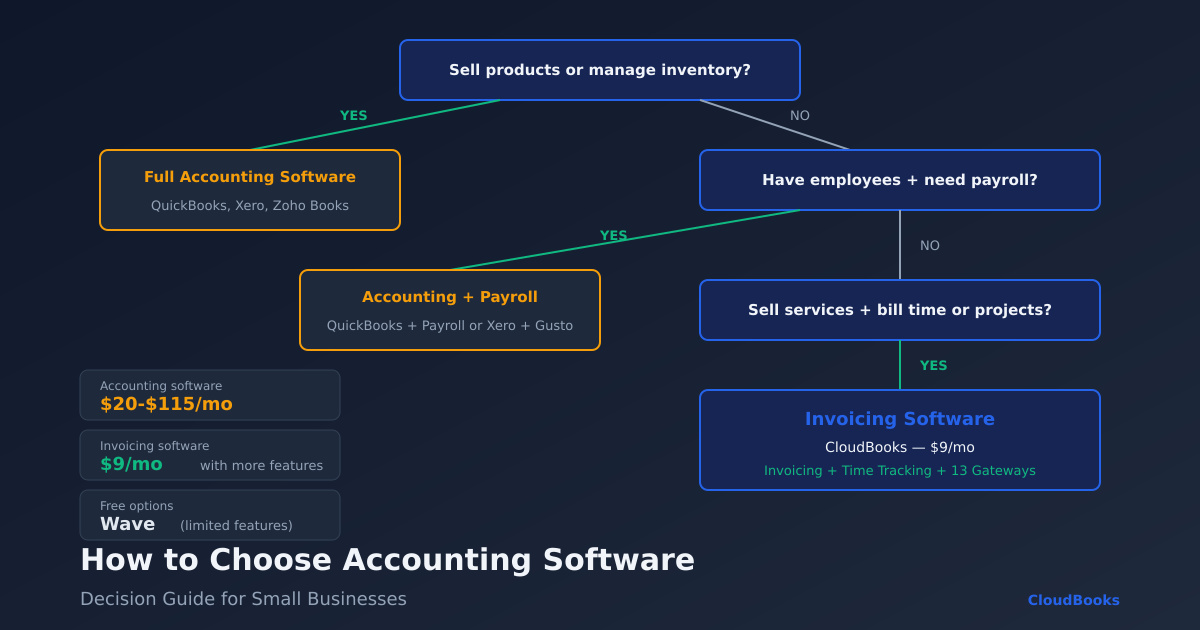
Use this flowchart:
- Do you sell physical products or manage inventory? → QuickBooks or Xero
- Do you have employees and need payroll? → QuickBooks or Xero with payroll add-on
- Do you sell services, bill by time or project, and need fast invoicing? → CloudBooks or FreshBooks
- Do you have international clients needing local payment methods? → CloudBooks (13 gateways)
- Is budget the primary concern and needs are minimal? → Wave (free) or CloudBooks ($9/month)
Getting started
The best accounting software is the one that matches your actual business workflow — not the one with the most features or the highest ranking on a review site. A $9/month invoicing tool that you use daily is more valuable than a $115/month accounting platform where you only use the invoice button.
If you are a freelancer or service business, try CloudBooks free for 15 days. Unlimited invoices, built-in time tracking, expense management, and 13 payment gateways — everything a service business needs to get paid, starting at $9/month.
Ready to streamline your invoicing?
Join 30,000+ businesses using CloudBooks to get paid faster.
Start Free TrialRelated Articles
Best Cloud Accounting Software for Small Businesses in 2026
Your accountant just asked for last quarter's profit-and-loss statement. You open a desktop spreadsh...
HoneyBook Alternative: Why Freelancers Are Switching to CloudBooks
HoneyBook is popular with event planners, photographers, and creative professionals who need proposa...
Small Business Bookkeeping: A Complete Beginner's Guide for 2026
You started a business to do work you are good at — design, consulting, development, photography. No...