Small Business Bookkeeping: A Complete Beginner's Guide for 2026
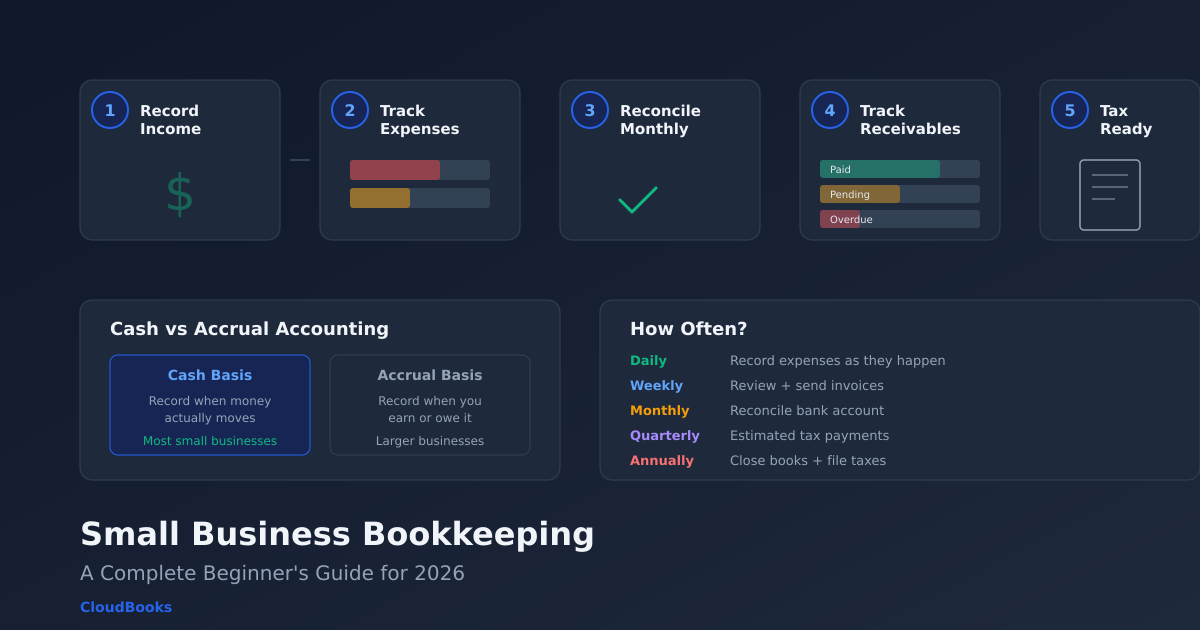
You started a business to do work you are good at — design, consulting, development, photography. Nobody warned you that 20% of running a business is keeping track of where the money goes. But here you are, staring at a bank statement full of transactions you vaguely remember, wondering whether that lunch was a business expense or a personal one, and dreading tax season.
Bookkeeping does not need to be complicated. At its core, it is recording what money comes in, what money goes out, and keeping enough detail that your tax return is accurate and your business decisions are informed. This guide covers exactly how to do that — whether you use software, a spreadsheet, or an accountant.
What bookkeeping actually is (and is not)
Bookkeeping is the process of recording every financial transaction your business makes. Money received from a client: recorded. Subscription payment for a software tool: recorded. Office supplies purchased with your business card: recorded.
Bookkeeping is not accounting. Accounting uses the data that bookkeeping produces to create financial statements, analyse business performance, file tax returns, and advise on financial strategy. A bookkeeper records transactions. An accountant interprets them.
Most small business owners need to do their own bookkeeping (or use software that automates it) and hire an accountant for quarterly or annual tax work. Trying to skip bookkeeping and hand your accountant a shoebox of receipts at tax time is possible, but it costs you — accountants charge by the hour, and sorting unsorted records takes a lot of hours.
The five bookkeeping tasks every small business must do
1. Record all income
Every time money enters your business — a client payment, a product sale, interest income, a refund received — it needs to be recorded with the date, amount, source, and category. If you use invoicing software, income from invoices is recorded automatically when clients pay. Cash income and other sources need manual entry.
The key discipline: record income when it is received, not when it is invoiced (unless you use accrual accounting, which most small businesses do not). A $5,000 invoice sent in October but paid in November is November income for tax purposes under cash-basis accounting.
2. Record all expenses
Every business expenditure needs the same treatment: date, amount, payee, category, and a receipt or proof of payment. Common expense categories for service businesses:
- Software and subscriptions — tools you pay for monthly or annually
- Office and workspace — rent, coworking fees, home office deductions
- Professional services — accountant, lawyer, virtual assistant
- Marketing — advertising, website hosting, domain renewals
- Travel — flights, hotels, ground transport for client meetings
- Meals — client meals and working lunches (rules vary by country)
- Equipment — computer, monitor, peripherals (may be capitalised depending on amount)
- Contractor payments — payments to subcontractors or freelancers you hire
- Bank and payment fees — transaction fees, currency conversion costs
- Insurance — professional liability, health (if self-employed)
The receipt is critical. In most jurisdictions, claiming a business expense deduction without a receipt is a gamble during an audit. Photograph every receipt immediately and store it digitally — the paper will fade, but a photo in your expense tracker will not.
3. Reconcile your bank account
Bank reconciliation means comparing your recorded transactions against your bank statement to make sure they match. Every transaction in your books should appear on the bank statement, and vice versa. Discrepancies mean something was recorded wrong, missed entirely, or — in rare cases — someone made an unauthorised transaction.
If you use accounting software with bank feeds (QuickBooks, Xero), reconciliation is semi-automatic — the software pulls in transactions and you confirm or categorise each one. If you use invoicing software or spreadsheets, reconciliation is a monthly manual check: print the bank statement, tick off each transaction against your records, and investigate anything that does not match.
Do this monthly. Quarterly is survivable. Annually is painful and error-prone.
4. Track accounts receivable
Accounts receivable (AR) is money your clients owe you for work you have invoiced but they have not yet paid. Tracking AR means knowing, at any moment, how much money is outstanding, which invoices are overdue, and which clients are consistently late.
Good invoicing software tracks this automatically — every invoice is either paid, partially paid, overdue, or upcoming. You can pull an aged receivables report that shows invoices grouped by how overdue they are (current, 1-30 days, 31-60 days, 60+ days). This report is your cash-flow early warning system.
If AR is growing — more and more money sitting unpaid for longer — you have a collection problem. Automatic payment reminders help, but you may also need to shorten your payment terms or require deposits for new projects.
5. Prepare for tax time
If you do the first four tasks consistently, tax preparation becomes a data-export exercise rather than a reconstruction project. Your accountant needs:
- Total income by category (services, products, other)
- Total expenses by category (each deductible category)
- Outstanding receivables (if using accrual accounting)
- Major asset purchases (equipment over the capitalisation threshold)
- Contractor payments (for 1099 or equivalent reporting)
If your books are clean, your accountant can prepare your return in a few hours. If they are not, expect to pay for the sorting time.
Cash basis vs accrual accounting
This is the most common bookkeeping decision small business owners face, and the answer for most is simpler than it sounds:
Cash basis: Record income when you receive the money, and expenses when you pay them. If you invoice in October and get paid in November, it is November income. Simple, intuitive, and what most freelancers and small businesses use.
Accrual basis: Record income when you earn it (issue the invoice), and expenses when you incur them (receive the bill), regardless of when cash moves. The October invoice is October income even if paid in November. Required for larger businesses and gives a more accurate picture of profitability, but more complex to maintain.
If your annual revenue is under the threshold where accrual accounting is legally required (this varies by country — in the US, it is generally $25 million), cash basis is fine. Ask your accountant to confirm.
Bookkeeping tools: what to use
Spreadsheets
A Google Sheet or Excel workbook with tabs for income, expenses, and a monthly summary works for very simple businesses. It costs nothing, you control the format completely, and it is better than nothing. The downsides: no automation, no bank feed, manual data entry for everything, and reconciliation is tedious.
Invoicing software
If you are a service business, invoicing software like CloudBooks handles income tracking automatically (invoices sent and payments received), expense tracking with receipt scanning, and basic financial reporting. It does not do formal bookkeeping (no chart of accounts or general ledger), but for most freelancers it covers 90% of what bookkeeping needs to accomplish — knowing what came in, what went out, and having clean records for your accountant.
Combined with time tracking and online payment collection, this is the most practical approach for solo service providers. You handle the day-to-day in one tool, export clean data at tax time, and let your accountant handle the formal accounting.
Accounting software
If you need formal double-entry bookkeeping — because you have inventory, run payroll, or need to produce financial statements — QuickBooks, Xero, or Zoho Books are the standard choices. They handle everything from bank reconciliation to balance sheets. The trade-off is cost ($20-115/month) and complexity (steeper learning curve, more features to configure).
For a detailed comparison of whether you need accounting software or invoicing software, read our guide on accounting software vs invoicing software.
Common bookkeeping mistakes to avoid
Mixing personal and business finances
This is the number one mistake. If your client payments land in the same account you use for groceries and rent, separating business income from personal spending at tax time is a nightmare. Open a dedicated business bank account and use it exclusively for business transactions. This alone makes bookkeeping dramatically easier.
Not keeping receipts
A deduction without a receipt is a deduction your auditor can disallow. Photograph every business receipt the moment you get it. Use an expense tracker with receipt scanning — the photo is attached to the transaction record and stored permanently.
Categorising inconsistently
If you categorise your Adobe subscription as "Software" in January and "Office Expenses" in March, your expense reports and tax deductions are inaccurate. Pick categories once and stick to them. Good software auto-categorises based on the vendor, which eliminates this problem.
Ignoring small transactions
The $12 domain renewal, the $5 stock photo, the $8 parking fee — each one is small, but they add up to hundreds or thousands in deductible expenses over a year. Record everything.
Doing bookkeeping once a year
Annual bookkeeping is not bookkeeping — it is forensic accounting. You are reconstructing a year of transactions from incomplete records under time pressure. Monthly bookkeeping takes an hour. Annual bookkeeping takes days. Pick monthly.
How often should you do bookkeeping?
The ideal cadence for a small business:
- Daily: Record expenses as they happen (or use software that captures them automatically).
- Weekly: Review unbilled time and send invoices. Check for payments received. CloudBooks shows outstanding invoices and payment status at a glance.
- Monthly: Reconcile your bank account. Review your income vs expenses. Check accounts receivable for overdue invoices.
- Quarterly: Send records to your accountant for estimated tax payments (if required in your jurisdiction). Review spending trends and adjust your budget.
- Annually: Close the books for the year. Provide final records to your accountant for tax filing.
If you use invoicing software for day-to-day transactions, the daily and weekly tasks happen automatically. You mainly need to show up for the monthly reconciliation and quarterly accountant check-in.
Getting started
Bookkeeping does not require an accounting degree. It requires consistency: record income, record expenses, reconcile monthly, and keep receipts. The tools exist to make most of this automatic.
If you are a freelancer or small service business, CloudBooks handles the income side (invoicing, payments, receivables) and the expense side (tracking, receipts, categorisation) in one tool starting at $9/month. Your accountant gets clean data at tax time, and you spend your hours on client work instead of spreadsheets.
The best time to start bookkeeping was when you started the business. The second best time is now.
Ready to streamline your invoicing?
Join 30,000+ businesses using CloudBooks to get paid faster.
Start Free TrialRelated Articles
Best Cloud Accounting Software for Small Businesses in 2026
Your accountant just asked for last quarter's profit-and-loss statement. You open a desktop spreadsh...
HoneyBook Alternative: Why Freelancers Are Switching to CloudBooks
HoneyBook is popular with event planners, photographers, and creative professionals who need proposa...
How to Choose the Right Accounting Software for Your Small Business
You Google "best accounting software for small business" and get fifteen listicles that all recommen...