How to Track Billable Hours and Invoice Clients Faster
You finish a three-hour design session for a client. You meant to start the timer, but you forgot. Now you are guessing — was it two hours and forty minutes? Three and a half? You round down because you feel guilty rounding up, and you just lost $50 you earned.
This happens to every freelancer who bills by the hour. The problem is not discipline. The problem is that most people treat time tracking and invoicing as two separate activities, when they should be one continuous workflow. Track the time, convert it to an invoice, send it. No spreadsheets, no manual entry, no guessing.
This guide covers how to set that up — the methods, the tools, and the specific workflow that eliminates the gap between doing the work and getting paid for it.
Why most freelancers undercharge by 10–20%
Studies consistently show that professionals who track time manually underreport by 10–20%. The reasons are predictable:
- You forget to start the timer. You sit down, open the project, work for forty-five minutes, then remember you were supposed to be tracking. You estimate backward and round down.
- You discount small tasks. The five-minute email reply, the ten-minute revision call, the fifteen-minute feedback review. None of these feel like billable work individually, but they add up to hours every week.
- You batch your entries at the end of the week. By Friday, Monday is a blur. You reconstruct your hours from memory, calendar events, and Slack timestamps. You consistently underestimate.
- You feel uncomfortable billing for thinking time. Research, planning, and strategy work is real work. If a client is paying for your expertise, the time you spend thinking about their problem is billable — but it rarely makes it onto the invoice when tracked manually.
The fix is not trying harder to remember. The fix is making time tracking automatic enough that forgetting is not an option.
The three methods of tracking billable hours
Method 1: Manual entry (spreadsheets)
You open a spreadsheet at the end of the day or week, type in your hours per project, multiply by your rate, and transfer the totals to an invoice. This is how most freelancers start.
The problem: it relies entirely on memory. It is slow. It creates a gap between tracking and invoicing where errors accumulate. And when a client disputes an invoice, you have no audit trail beyond a row in a spreadsheet.
When it works: if you have one or two clients and bill in full-day increments (not hours), a spreadsheet is fine. Once you are juggling multiple clients, multiple projects, or hourly billing, it breaks down.
Method 2: Standalone time tracking apps
Tools like Toggl, Clockify, and Harvest let you start and stop timers, assign time entries to projects, and generate reports. They are purpose-built for time tracking and do it well.
The problem: the data lives in a separate app from your invoicing. At the end of the week, you export a report, open your invoicing tool, and manually create line items that match. Two apps, two logins, and a manual data transfer step where errors creep in. You also pay for two subscriptions.
When it works: if your invoicing needs are simple (flat monthly retainers, not itemised hourly invoices), a standalone tracker is fine because the time data is for your own reference, not for the invoice itself.
Method 3: Integrated time tracking + invoicing
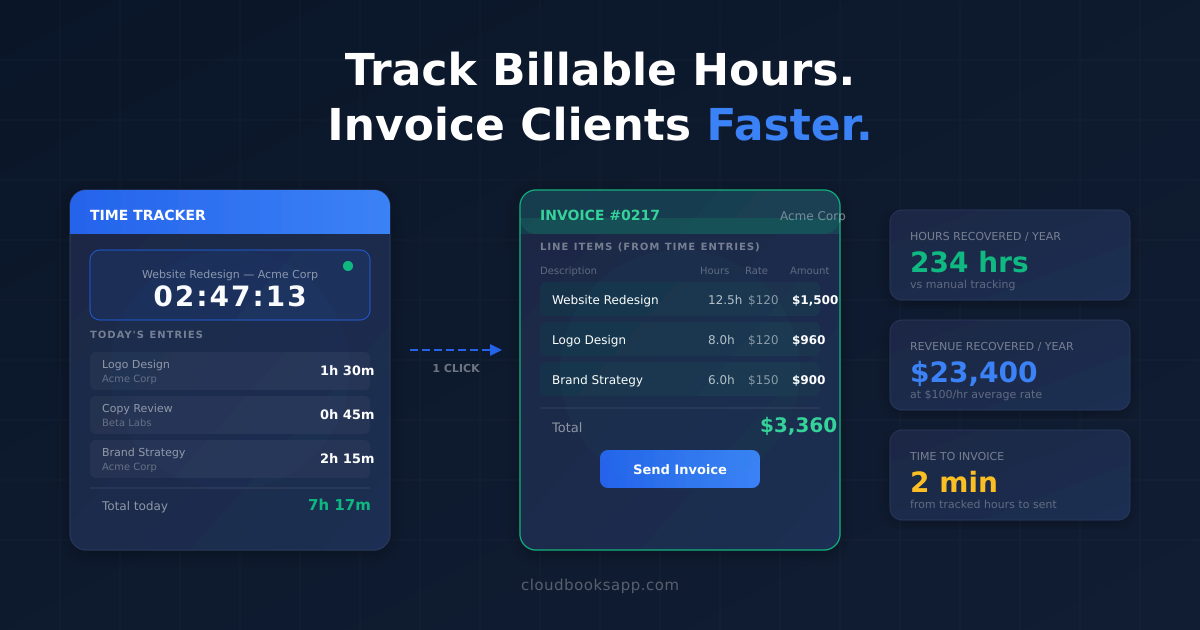
This is the approach that eliminates the gap. You track time inside the same tool that creates your invoices. When the tracking session ends, the hours are already associated with the right client and project. Converting them to an invoice is one click — the line items, rates, and totals are pre-filled.
CloudBooks includes time tracking in every plan with one-click timers that attach to projects and clients. When you are ready to bill, select the unbilled time entries, click "Create Invoice," and the invoice is generated with each entry as a line item — date, description, hours, rate, and total already filled in.
No export. No copy-paste. No second app.
Setting up an efficient billable hours workflow
Here is the step-by-step setup that takes time tracking from a chore to something that runs in the background of your workday:
Step 1: Set up clients and projects first
Before you track a single minute, create your clients and their projects in your invoicing software. Each project should have a name that matches how you talk about the work ("Website Redesign," not "Project #47") and an hourly rate attached.
If a project has a budget, set it now. Good software will warn you when tracked time approaches the budget so you can have the scope conversation before you have worked for free, not after.
Step 2: Use one-click timers, not manual entry
Every time you sit down to work on a client project, start the timer. One click. When you stop to check email, stop the timer. One click. When you come back to the project, start it again.
This sounds tedious, but in practice it takes two seconds and becomes automatic within a week. The alternative — trying to reconstruct your hours later — takes much longer and produces worse results.
CloudBooks timers run in the background while you work. You can see the active timer in the dashboard, switch between projects, and add a note about what you worked on. At the end of the day, every minute is accounted for.
Step 3: Categorise time as billable or non-billable
Not all work time is billable. Internal admin, invoicing itself, marketing, and professional development are part of running a business but do not belong on client invoices. Mark these entries as non-billable so they do not accidentally end up on an invoice, but do track them — knowing your billable-to-non-billable ratio tells you whether you are spending enough time on revenue-generating work.
A healthy ratio for a solo freelancer is 60–70% billable. If you are below 50%, you are spending more time running the business than doing the work, and something needs to change.
Step 4: Convert tracked time to invoices weekly or biweekly
Pick a billing cadence and stick to it. Weekly invoicing is ideal if you bill hourly — it keeps the amounts manageable for clients and gets you paid faster. Biweekly or monthly works for larger projects with predictable hours.
In CloudBooks, the workflow is:
- Go to the project or client
- Select unbilled time entries
- Click "Create Invoice"
- Review the auto-generated line items
- Send
The entire process takes under two minutes. Compare that to the thirty-minute ritual of exporting time data, opening a separate invoicing tool, manually entering line items, double-checking the math, and formatting the invoice.
Step 5: Automate the follow-up
Once the invoice is sent, set up automatic payment reminders. A reminder three days before the due date, a follow-up on the due date, and escalating reminders at seven and fourteen days overdue. Clients pay faster when the reminders are consistent and automatic — it removes the awkward "just following up" email you have to write yourself.
How to handle common billable hours scenarios
Multiple projects for the same client
Some clients have several active projects running in parallel. Track time separately per project so you can report hours at the project level, but invoice at the client level. The invoice shows line items grouped by project — the client sees exactly where their money went.
Different rates for different work
Strategy consulting at $200/hour, implementation at $120/hour, and revisions at $80/hour — all for the same client. Set different rates per project or per task type, and the invoice calculates the mixed total automatically.
Team time tracking
If you have subcontractors or team members working on client projects, everyone tracks time in the same system. You see aggregate hours per project, each person's contribution, and the total cost versus budget. The invoice can show individual contributors or roll everything up — your choice.
CloudBooks supports team members on the Team plan ($19/month) with role-based access so each person tracks their own time without seeing other people's rates or the overall financials.
Fixed-price projects with time tracking
Even if you bill a flat rate, tracking time tells you whether the project was profitable. If you quoted $5,000 for a project and spent 80 hours on it, your effective rate was $62.50/hour. If your target is $100/hour, you underquoted by 37%. That data informs your next estimate.
What to look for in time tracking software
If you are evaluating tools, here is what matters for a freelancer or small team billing by the hour:
- One-click timers. If starting a timer takes more than one click, you will not use it consistently. The timer should be accessible from every screen in the app, not buried in a submenu.
- Direct invoice conversion. Tracked hours should convert to invoice line items without export or manual entry. This is the feature that saves the most time and eliminates the most errors.
- Project budgets. Set a budget in hours or dollars, get notified when you approach it. This prevents scope creep from becoming unpaid work.
- Billable vs non-billable toggle. Mark entries so only billable time appears on invoices, while non-billable time is still tracked for your own reporting.
- Reporting by client, project, and date range. At tax time and during client reviews, you need to pull up how much time went where. Clean reports grouped by any dimension save hours of spreadsheet work.
- Mobile access. If you work on-site, in meetings, or on the go, starting a timer from your phone should be as easy as from your desktop.
How the major tools compare on time tracking
| Tool | Time tracking | Timer to invoice | Starting price |
|---|---|---|---|
| CloudBooks | Built in, every plan | One-click conversion | $9/mo |
| FreshBooks | Built in | Requires manual selection | $19/mo |
| Harvest | Built in | Export to separate invoicing | $11/mo |
| Toggl Track | Built in | No invoicing — export only | Free / $10/mo |
| QuickBooks | Plus plan only | Available on Plus ($115/mo) | $30/mo |
| Xero | Projects add-on ($10/mo) | Manual | $20/mo + add-on |
| Wave | None | N/A | Free |
The key distinction is whether time tracking connects to invoicing or lives in a separate workflow. Standalone trackers like Toggl and Clockify are excellent at tracking but create a manual transfer step. Accounting-first tools like QuickBooks and Xero either charge extra for time tracking or hide it behind expensive plans. Invoicing-first tools like CloudBooks and FreshBooks build the timer-to-invoice flow into the core product.
The maths: how much unbilled time costs you
Assume you bill $100/hour and work 30 billable hours per week. If you undertrack by just 15% — the conservative end of the range for manual trackers — you are losing 4.5 hours per week. That is:
- $450 per week
- $1,950 per month
- $23,400 per year
At $75/hour, it is $17,550/year. At $150/hour, it is $35,100/year. These are not hypothetical numbers — they are the documented gap between manual time reconstruction and real-time tracking across multiple studies of professional services firms.
A $9/month invoicing tool with built-in time tracking pays for itself in the first hour of recovered billable time. Everything after that is pure upside.
Getting started
The workflow is simple: track time as you work, convert tracked time to invoices, send them, and let automatic reminders handle the follow-up. The entire cycle — from starting the timer to sending the invoice — should take less time than writing a single follow-up email.
CloudBooks includes one-click time tracking, direct timer-to-invoice conversion, project budgets, team tracking, and 13 payment gateways so clients can pay the moment they open the invoice. Plans start at $9/month with unlimited invoices and time tracking on every plan.
Stop guessing your hours. Start tracking them.
Ready to streamline your invoicing?
Join 30,000+ businesses using CloudBooks to get paid faster.
Start Free TrialRelated Articles
Accounting Software vs Invoicing Software: Which Does Your Business Actually Need?
You search for "best accounting software for small business" and get a wall of results: QuickBooks, ...
How to Accept International Payments as a Freelancer in 2026
You land a client in Berlin, another in Lagos, a third in São Paulo. The work goes well. Then the in...
How AI Is Changing Invoicing and Bookkeeping for Small Businesses
Small business owners spend an average of five hours a week on invoicing and bookkeeping. That is fi...